2025-2026 Spring Semester Course Registration — Associate, Bachelor’s and Graduate Programs
20 January 20263 min read
At the start of each semester, our students renew their enrollment by paying the tuition fees they are required to pay within the announced periods, and then complete their course registrations.
The following sections cover enrollment renewal dates, course registration procedures and tuition payment.
1. IMPORTANT NOTES ON TUITION PAYMENT
Students who have outstanding balances from previous semesters will not have access to the registration page and will be unable to complete course registration. To proceed with current-semester procedures, all prior-semester debts must first be settled.
On the Student Information System, course registration continues, or the student is redirected to payment, based on the Financial Eligibility Status shown on the Course Registration > Student Information screen.
The two possible outcomes of the Financial Eligibility check, and the steps to follow in each case, are illustrated below:
Once Financial Eligibility is cleared, students should follow the steps below to select courses.
2. IMPORTANT NOTES ON COURSE SELECTION
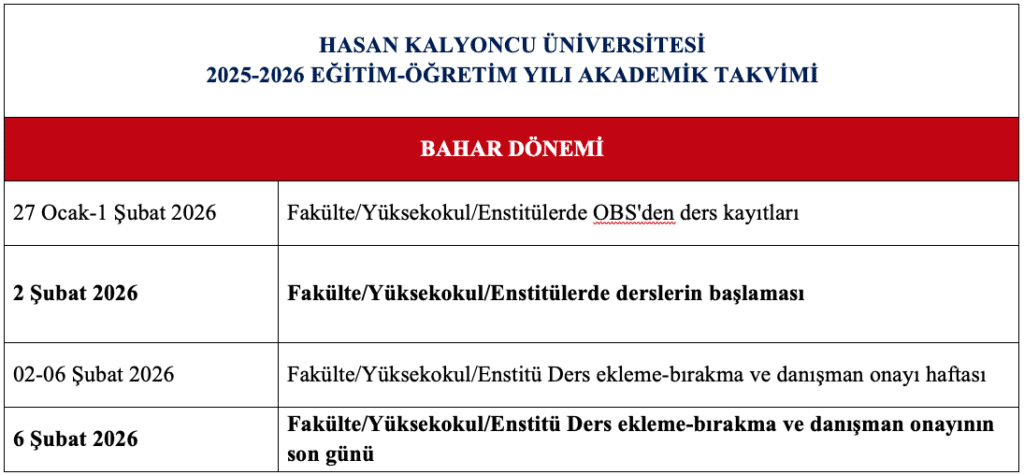
All students except those in the Preparatory Class will complete their 2025-2026 Spring Semester course registration online between January 27, 2026 (10:00 a.m.) and February 1, 2026 (11:59 p.m.).
If you are logging in for the first time, or if your current password contains your national ID number, the system will require you to change your password through the Change Password screen.
Course registration is performed through the Student Information System (SIS) and must be approved by the academic advisor. Every course selected by the student must be approved by the advisor. Courses left pending approval are not registered. Full responsibility in this regard rests with the student.
If a course registration is rejected by the advisor, the student must revise their selection in line with the advisor’s instructions.
Students who have completed their course registration may make changes to their selected courses during the add/drop week as defined in the academic calendar.
Students may be unable to complete course registration because of unpaid tuition or for other reasons. However, such periods still count toward the maximum permitted study duration. Students in this situation cannot benefit from student rights (student certificate, ID card, military service notifications, etc.), and the relevant notification is sent to the military recruitment office for male students. Students who do not wish this period to count toward their study duration may apply for an academic leave.
3. SUMMARY OF COURSE-REGISTRATION DATES FROM THE 2025-2026 ACADEMIC CALENDAR
4. HOW TO COMPLETE COURSE REGISTRATION
After logging into the Student Information System (SIS), follow these steps to register for courses:
Select the “Course and Semester Operations” menu (1).
Select the “Course Registration” menu (2).
When the “Course Selection” screen opens, the courses offered in semesters 2, 4 and 6 will appear on the right-hand side of the screen (3).
Select the relevant courses from the list and add each course to the system from the page that opens (4).
Once course selection is complete, save the selections by clicking VERIFY (5), then finalize the process by clicking CONFIRM (6).
Note: After completing course registration, it is essential to check your Advisor Approval Status between February 2 and February 6, 2026.
IF YOU ARE UNABLE TO LOG IN, PLEASE EMAIL YOUR QUESTIONS AND ISSUES TO